Your Website Is Costing Sales
🧠 Optimize buying behavior on your site, plus simplify call note-taking

Hello Readers 🥰
Welcome to today's edition, bringing the latest growth stories fresh to your inbox.
If your pal sent this to you, then subscribe to be the savviest marketer in the room😉
In Partnership with AirOps
ChatGPT doesn't cite simple content. It never did.
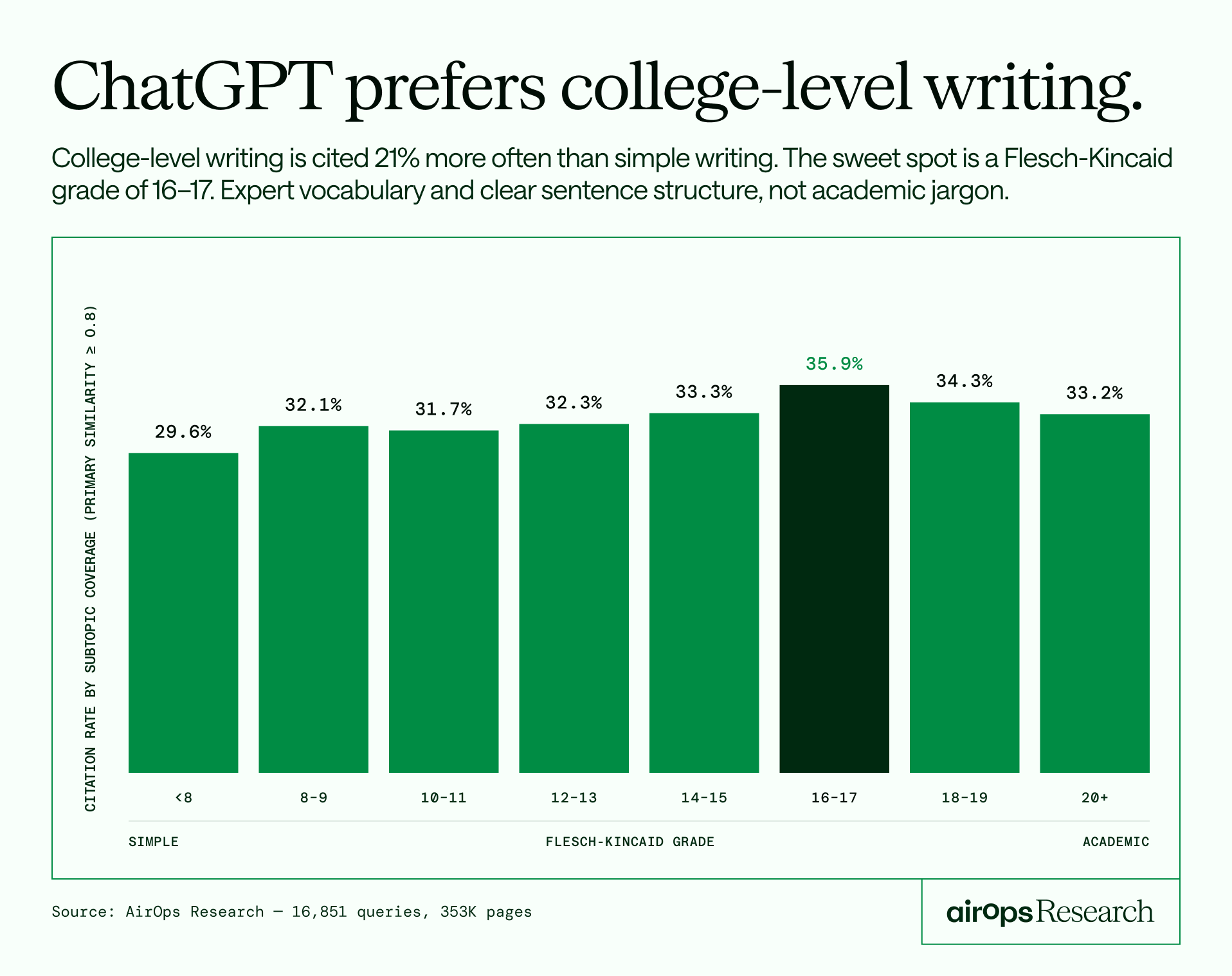
Most marketers are writing for readability. Shorter sentences, simpler words, easier skimming. ChatGPT is penalizing them for it.
AirOps studied 16,851 queries and 353,799 pages across 10 industries and tracked 20 signals to find out exactly what gets a page cited versus ignored.
Here's what the data found:
- Pages ranked in position 1 get cited 4x more than position 10. If you're not on page one, you're essentially invisible to AI.
- Comprehensive guides are getting outperformed by focused 800-word pages. Everything you built for SEO may be working against you.
- Pages aged 30-90 days hit the highest citation rate. Your older content is bleeding visibility silently.
The report breaks down all 20 signals with controlled comparisons across each. No theory. Just data on what ChatGPT actually responds to.
📝 Build a Gator-Friendly Website
Your website is not losing sales because of ads, pricing, or offers. The real issue is how your visitors think and behave.
Every buyer operates in two modes.
The first is the Gator. This is the fast, instinctive brain that scrolls, clicks, and buys without overthinking. Nearly all decisions happen here.
The second is the Judge. This is the slow, analytical brain that steps in when something feels confusing or difficult. Once activated, it questions everything and often kills the purchase.
Your goal is simple. Keep the Gator moving and prevent the Judge from taking over.
Understanding purchase intent velocity:
Think of your website like a ramp. Every section either builds momentum toward a purchase or slows it down. If the emotional desire becomes strong enough, it overcomes the hesitation to spend. If not, the visitor drops off before checkout.
Most conversion problems do not start at checkout. They begin much earlier with weak messaging, friction, or confusion.
How to create a gator-friendly experience:
Write simple and clear copy:
Avoid complex language. Easy-to-read content keeps visitors moving without triggering doubt or analysis.
Focus on outcome-driven headlines:
Lead with the result your customer wants, not the product itself. Show the transformation clearly and instantly.
Prioritize above the fold content:
Most visitors never scroll far. Your headline, visuals, and call to action must do the heavy lifting.
Learn directly from customers:
Ask buyers what they wanted and why they purchased. Use their answers to refine your messaging and experience.
The Takeaway
Winning websites are not just visually appealing. They align with how people think and decide. Reduce friction, increase clarity, and guide users smoothly from interest to action.
📝 Take AI Notes on Phone Calls
Want to capture every important detail from your phone calls without manually writing notes? With Granola, you can turn any call into structured summaries with action items in minutes. Most people only use AI notetakers for online meetings, but this setup works seamlessly for both outgoing and incoming calls on your iPhone.
Steps to Set Up AI Call Notes with Granola:
1️⃣ Install and Set Up Granola
Download Granola from the App Store and open the app. Tap the phone icon at the bottom left to begin setup. Enter your phone number and complete the verification process to activate call recording and transcription.
2️⃣ Make Calls with AI Assistance
Use the in-app phone button to dial a contact or enter a number manually. The call functions just like a regular phone call, but Granola runs quietly in the background, capturing and processing the conversation in real time.
3️⃣ Get Instant Summaries After Calls
Once the call ends, give it a minute. Granola automatically generates a clean summary, including key points, action items, and important highlights. You do not need to stay on the screen while it processes.
4️⃣ Handle Incoming Calls Smartly
For inbound calls, open Granola and create a new note before answering. While it mainly captures your voice in this mode, it still helps log key details and context for later use.
The Takeaway
Granola transforms your phone calls into actionable insights without effort. By automating note-taking, you stay focused on conversations while ensuring nothing important gets missed.
We'd love to hear your feedback on today's issue! Simply reply to this email and share your thoughts on how we can improve our content and format.
Have a great day, and we'll be back again with more such content 😍