Your Amazon page is leaking revenue
📦 Fix Amazon conversion leaks then automate tasks remotely with Claude

Hello Readers 🥰
Welcome to today's edition, bringing the latest growth stories fresh to your inbox.
If your pal sent this to you, then subscribe to be the savviest marketer in the room😉
In Partnership with AirOps
ChatGPT judges a page by its cover.
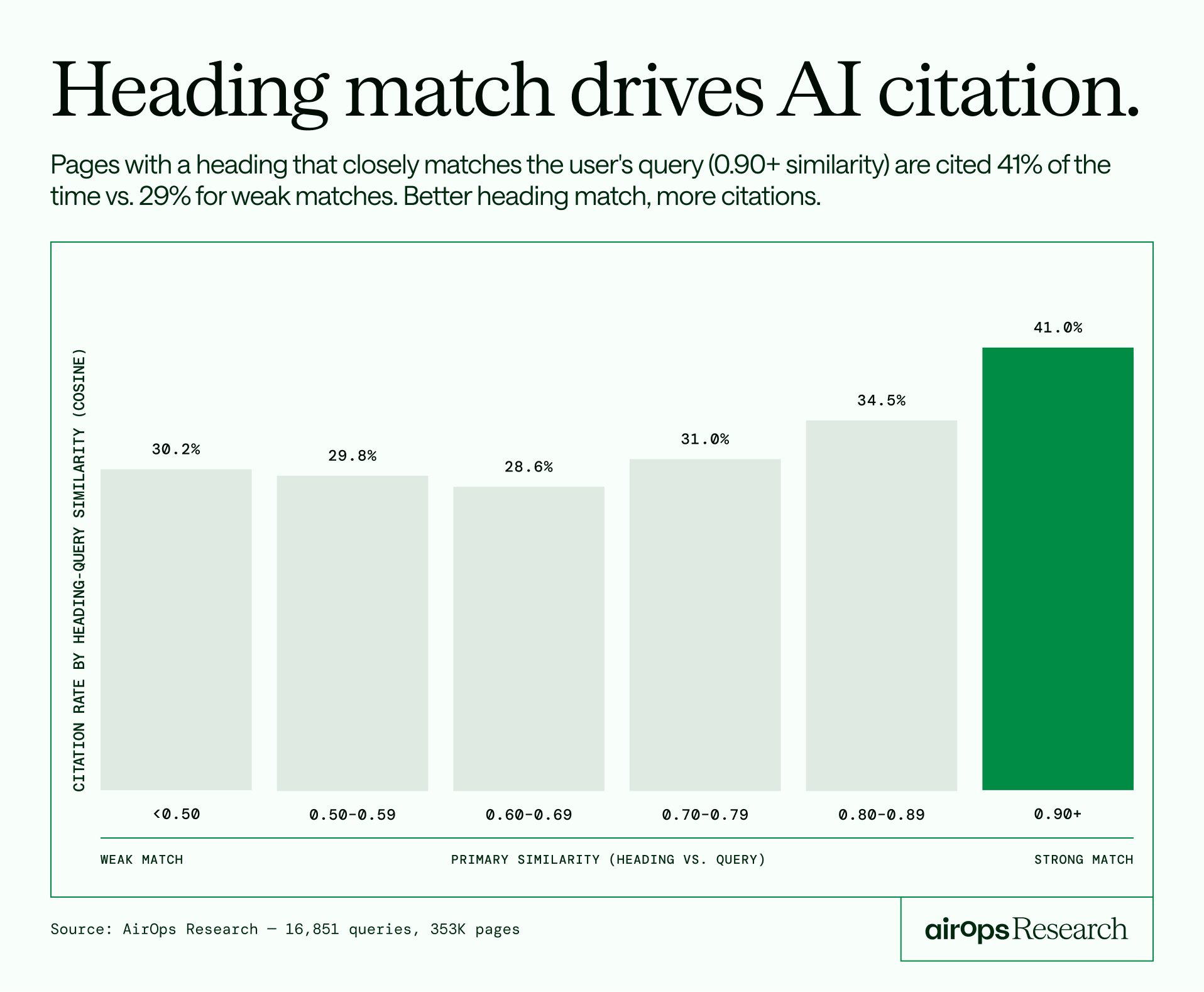
Pages with headlines that directly answer the query get cited 41% of the time. Loosely related headlines? 29%.
AirOps studied 16,851 ChatGPT queries and 353,799 pages across 10 industries to find what separates cited pages from ignored ones. A few findings that stood out to me:
- Retrieval rank is the top signal: A page at position 1 has a 58% chance of being cited. By position 10, that drops to 14%.
- Comprehensive guides don't always win: Pages covering 26-50% of ChatGPT's sub-queries get cited more often than pages covering 100%.
- Domain authority doesn't predict citation: Always-cited pages actually have lower DA than never-cited ones. Content quality is what counts.
The full report covers 20+ signals with controlled comparisons across each.
📝 Fix Your Amazon PDP to Boost ROAS
Insights from DTC
📦 - Amazon Creative Audit Red Flags - DTC Newsletter | DTC Newsletter Mar 24, 2026
A strong ROAS is not just about better bidding. It is about what happens after the click. If shoppers land on your product page and do not convert, your creative is the problem. Traffic without conversion is wasted spend.
Steps to Improve PDP Performance:
1️⃣ Make Mobile Readability Non-Negotiable: Most shoppers browse on mobile. If your text is hard to read without zooming, you lose instantly. Use bold fonts, high contrast, and ensure key benefits are visible even in thumbnails.

2️⃣ Simplify Your Visual Messaging: Overloaded infographics confuse buyers. When you try to say everything, nothing lands. Focus on one clear message per image. Break complex ideas into multiple tiles for clarity.

3️⃣ Show the Problem and Solution: Shoppers come with a need. If your images only show the product, you miss the chance to create urgency. Highlight the problem and clearly position your product as the solution.
4️⃣ Maintain Brand Consistency: Your product page should match your overall brand experience. Mismatched visuals, outdated assets, or inconsistent design reduce trust and credibility.
5️⃣ Add Motion and Proof: Static images are no longer enough. Use short videos, product demos, and real customer experiences to bring your product to life. Motion captures attention and builds confidence.
The Takeaway: Your product page is where conversions happen. Even small creative improvements can unlock significant gains in performance. Instead of pushing more traffic, fix what happens after the click. When your PDP communicates clearly, builds trust, and engages shoppers, your ROAS improves naturally.
📝 Let Claude Work on Your Computer with Dispatch
Insights from Rundown AI
Staying productive when you step away from your desk is tough. Tasks pile up, workflows break, and momentum slows down. But with Dispatch, you can hand off work to Claude directly from your phone and let it continue on your computer in the background.
Steps to Use Claude Dispatch Seamlessly:
1️⃣ Update Your Apps First: Make sure both your desktop and mobile apps are up to date. On desktop, check for updates from the toolbar. Do the same on your phone to ensure everything syncs properly.
2️⃣ Enable Dispatch on Desktop: Open the desktop app, navigate to Dispatch, and click get started. Turn on file access and keep-awake mode so Claude can interact with files and continue working without interruptions.
3️⃣ Pair Your Phone and Computer: Connect your mobile app to your desktop. This allows you to send tasks remotely and have them executed on your computer without needing to be physically present.
4️⃣ Send Tasks from Your Phone: You can now assign tasks like organizing files, cleaning up folders, or managing documents directly from your phone. Claude will execute these tasks on your desktop environment.
5️⃣ Track Progress Across Devices: Once the task is complete, you can review results on either your phone or computer. The conversation remains synced, so you can continue refining or adding instructions without starting over.
6️⃣ Keep Your Workspace Organized: Before starting, create a dedicated project folder. This ensures all outputs are stored in one place, making it easier to locate and manage files later.
The Takeaway: Claude Dispatch turns your computer into a remote work engine. By allowing tasks to run in the background while you are away, it keeps your workflow moving and your productivity consistent without extra effort.
We'd love to hear your feedback on today's issue! Simply reply to this email and share your thoughts on how we can improve our content and format.
Have a great day, and we'll be back again with more such content 😍