December Builds Valentines Wins
🛠️ Build Valentines launches in December, plus deliver code faster inside Slack

Hello Readers 🥰
Welcome to today's edition, bringing the latest growth stories fresh to your inbox.
If your pal sent this to you, then subscribe to be the savviest marketer in the room😉
In Partnership Cloudways
Tired of Slow Hosting? Your Q5 Scaling Secret is Here.
Stop letting frustrating server management and unreliable performance sabotage your agency or freelance projects.
Cloudways is a managed cloud hosting platform designed for marketers, freelancers, and agencies that need to scale effortlessly. They handle the complex stuff. Built for serious performance and backed by 24/7 expert support.
Cloudways handles everything from lightning-fast page loading to complex server maintenance, letting you focus on what matters most: landing clients and launching winning campaigns.
The Deal is Simple: Get 30% OFF for 3 Months plus 50 Free Migrations. Whether you're running PHP, WordPress, Magento, or Laravel, their smallest server starts at just $7!
Click to Claim Your Deal Before It’s Gone!
💗 Valentine’s Day Winners Start Now
Black Friday is over, but the next major seasonal spike is closer than it looks. Valentine’s Day planning starts earlier than most brands expect because high-intent shoppers begin browsing gifts weeks before February.
If you wait until the holiday is around the corner, you will rush to finalize your product mix, scramble for creative ideas, and launch after the market is already crowded. The smartest teams use December to lock decisions early so execution in January feels smooth and confident.
Steps to Prepare for Valentine’s Day Early:
1️⃣ Audit What Worked Before
Review last year’s Valentine’s SKUs, bundles, and limited drops. Identify patterns in colors, styles, and price points that consistently performed. If your catalog is not naturally giftable, choose a complementary add-on you can position as a simple gift upgrade. Pull historic sales volume so you can forecast inventory and plan promotion depth with clarity.
2️⃣ Study Competitor Playbooks
Look at what direct and adjacent competitors ran in recent seasons. Pay attention to what actually earned engagement, not just what looked nice. Extract the offer angles, bundles, and messaging themes, then decide what you can adapt, improve, or differentiate. This research will shape your creative direction and help you avoid copying the obvious.
3️⃣ Start Creative and Photography Planning Now
Valentine’s Day is visual. Emotional storytelling, cozy couple moments, and seasonal color palettes tend to capture attention and drive conversions. Planning in December gives you time to align on themes, schedule shoots, and build assets for paid social, email, and onsite.
4️⃣ Set the Launch Timeline Early
Shoppers often browse in late Q5 and January. Work backwards from your ideal launch date and map out teasers, email pushes, paid social bursts, and landing page updates so everything lands on time.
The Takeaway
Valentine’s Day campaigns that convert are built months ahead. Audit the past, analyze the market, lock creative direction, and set your timeline before the new year so you can win when demand spikes.
👨💻 Fix Bugs and Ship Features From Slack
Most teams lose momentum because execution is fragmented. A bug gets reported in Slack, then someone has to open a ticket, switch to a code editor, dig through context, and finally start coding. This workflow removes those handoffs by letting you assign engineering tasks directly inside Slack.
With an autonomous coding assistant connected to your repo, you can request fixes and features where the conversation already happens. It reads the thread, gathers context from recent messages, and helps move work forward without you leaving Slack.
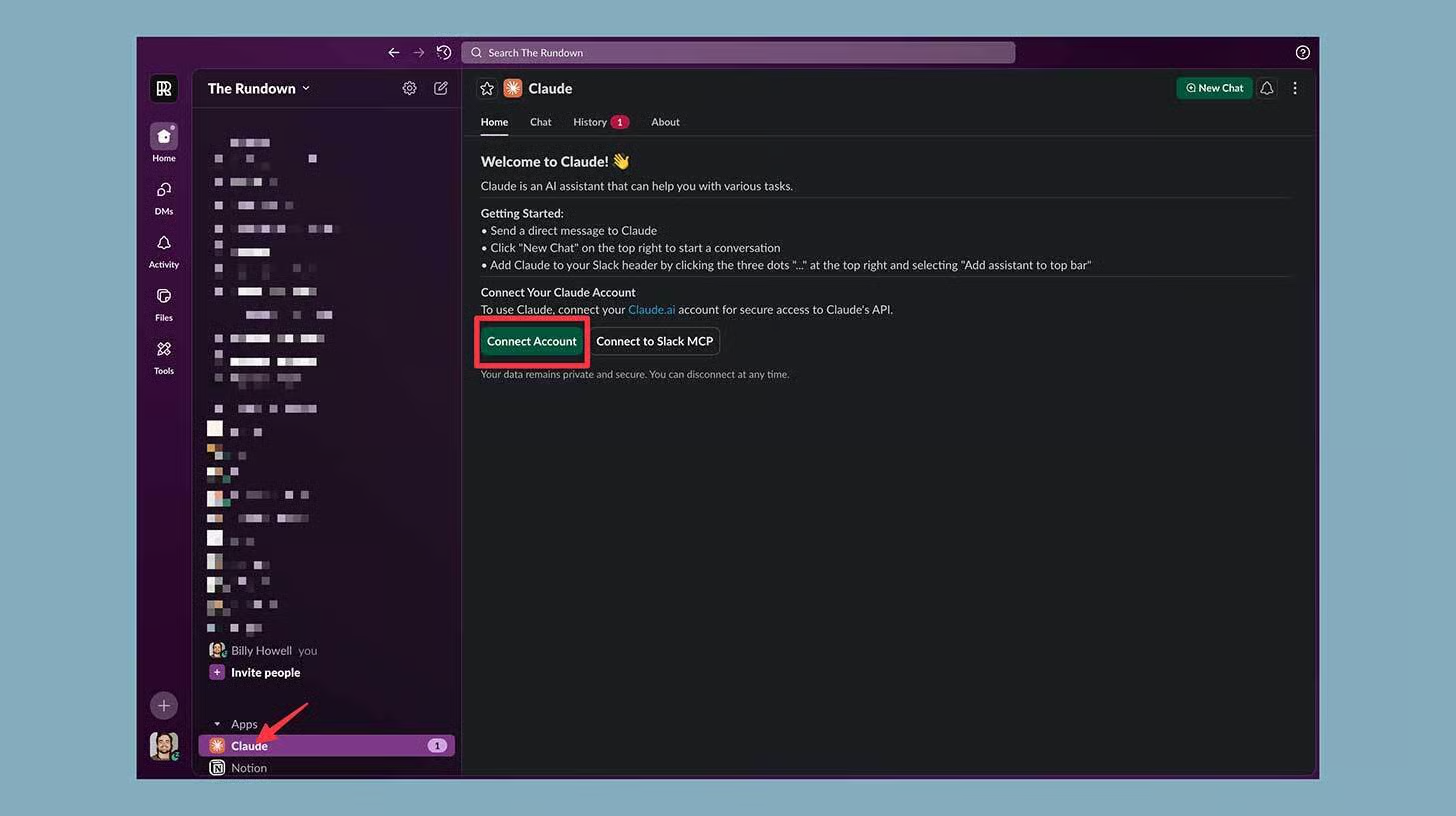
Steps to Use an Autonomous Coding Assistant in Slack:
1️⃣ Connect It to Your GitHub Repo
Start by linking the Claude code to your GitHub account using the official connection flow. This gives it permission to view relevant code and understand the project structure.
2️⃣ Add the App to Your Slack Workspace
Install the app in your workspace. After installation, you should see it available in Slack so you can access it from the sidebar like any other Slack app.
3️⃣ Connect Your Slack Account
Click the Connect account and authorize access so the assistant can read messages where it is invited. This is what allows it to build context from the discussion instead of working blind.
4️⃣ Invite It Into a Channel
Add it to an existing channel or create a new one for engineering requests. Type the mention command, then approve adding it when Slack prompts you.
5️⃣ Assign Tasks Using Mentions
Now you can mention it and give a clear task like fixing a bug, adding a feature, or refactoring a function. Because it can reference recent Slack messages, you can include less repeated context and focus on the outcome you want.
The Takeaway
If Slack is where work begins, it can also be where work ships. Embedding a coding assistant into your workflow reduces context switching and speeds up the path from discussion to deployment.
We'd love to hear your feedback on today's issue! Simply reply to this email and share your thoughts on how we can improve our content and format.
Have a great day, and we'll be back again with more such content 😍