Cheap Leads Or Real Revenue
💰 Are your leads profitable, plus a faster way to mass produce AI videos

Hello Readers 🥰
Welcome to today's edition, bringing the latest growth stories fresh to your inbox.
If your pal sent this to you, then subscribe to be the savviest marketer in the room😉
In Partnership with The Shift
Master AI In Just 5 Minutes A Day With This Free Newsletter

AI can do a lot, but most newsletters leave you wondering what’s actually worth trying.
That’s where The Shift comes in.
It doesn’t just tell you what’s new in AI. Every edition always answers ONE question:
“What can you do with AI today that saves you time, money, or effort?”
In The Shift, you’ll get:
✅ Real-world examples of smart AI hacks by brands that you can steal
✅ Mini step-by-step guides to build smarter AI workflows in minutes
✅ Access to 3,000+ curated AI tools and free courses
✅ 500+ powerful AI prompts you can copy/paste/tweak
No hype. No wasted time. No “just in case” news.
If it’s in The Shift, it’s because it can make your work better. Today.
Subscribe to The Shift now - it’s free!
📝 Measure Whether Your Lead Gen Actually Pays Off
Running lead generation campaigns feels productive. You collect emails, watch your cost per lead drop, and assume success. But most brands stop there. They never answer the question that actually matters: did those leads turn into profitable customers?
Cheap leads are easy to celebrate. Profitable leads are harder to prove.
That gap is where most e-commerce teams make bad decisions. They scale campaigns that look efficient on the surface, while ignoring whether those leads ever convert at the same level as evergreen or promotional traffic.
This framework helps you evaluate lead gen properly by focusing on outcomes, not vanity metrics.
Steps to Calculate True Lead Gen ROI
1️⃣ Start With Four Core Inputs
You do not need complex attribution models. All you need are four numbers:
- Total ad spend
- Total leads generated
- Conversion rate from lead to purchase
- Average order value
These inputs are enough to reveal whether your campaign created or destroyed value.
2️⃣ Convert Leads Into Revenue
Multiply your leads by the conversion rate to estimate how many customers your campaign produced. Then multiply that by the average order value to calculate revenue generated from those leads.
This reframes lead gen as an acquisition channel, not a list-building exercise.
3️⃣ Compare Against Other Campaigns
Now compare the resulting return to your evergreen, sale, or product-drop campaigns from the same period. This is where clarity appears. Some lead gen campaigns outperform standard acquisition. Others quietly underperform despite low CPLs.
4️⃣ Use ROAS as a Decision Filter
If lead gen delivers a similar or better return than your baseline campaigns, it earns more budget. If it underperforms, pause it and reallocate spend. Optimisation should follow profit, not volume.
5️⃣ Apply Before Every Major Launch
Run this analysis before scaling lead gen again. Past performance is your best predictor of future efficiency.
The Takeaway
Lead generation is not good or bad by default. It is only useful if it creates profitable customers. Stop optimizing for cheap leads. Start optimizing for real return. When you measure lead gen like acquisition, your budget decisions get simpler and far more effective.
📝 Quickly Iterate on AI Videos with Sora Automation
Creating high-quality AI videos is no longer the hard part. The real bottleneck is iteration. Writing prompts, generating multiple versions, downloading files, renaming them, and organizing outputs can quickly turn experimentation into manual busywork.
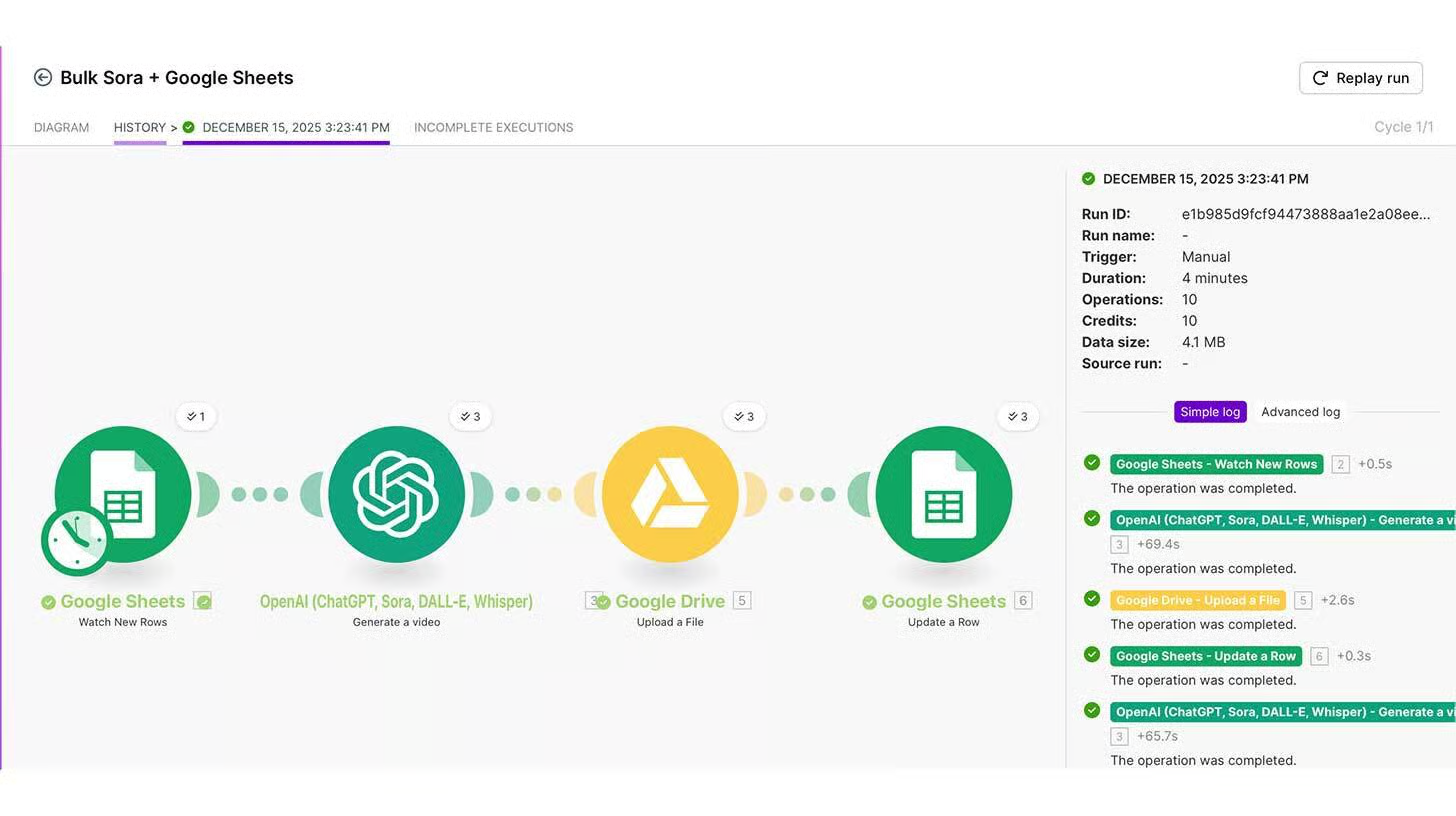
This workflow removes that friction by automating the entire loop. Instead of managing videos one by one, you generate Sora videos in bulk using a simple automation that connects Google Sheets, Make.com, and Google Drive. Prompts go in. Finished videos come out. No babysitting required.
Steps to Automate Sora Video Generation
1️⃣ Set Up a Prompt Control Sheet
Start with a Google Sheet that acts as your command center. Each row represents one video. Include columns for an ID, the Sora prompt, status, and a Drive link. This makes prompt iteration structured and repeatable.
2️⃣ Create a New Automation Scenario
Log into Make.com and create a new scenario. Add Google Sheets as the trigger and use the “Watch Rows” module so the automation listens for new or updated prompts in your sheet.
3️⃣ Connect Sora for Video Generation
Add a Sora module and connect it using your API key. This step allows Make to send prompts directly to Sora and receive completed video files automatically.
4️⃣ Store Outputs in Google Drive
Create a dedicated Google Drive folder for outputs. Add the “Upload a File” module so every finished video is saved and organized without manual downloads.
5️⃣ Sync Results Back to the Sheet
Add a Google Sheets “Update a Row” module. Once a video finishes, write the Drive web view link back into the corresponding row. Your sheet becomes a live dashboard of completed videos.
6️⃣ Speed Up Iteration with Webhooks
Instead of waiting for scheduled checks, configure a webhook so the automation runs instantly whenever a row is updated. This turns your sheet into a real-time production pipeline.
The Takeaway
This setup turns Sora video creation into an assembly line. Prompts live in one place. Videos generate automatically. Outputs stay organized. When iteration is frictionless, creative testing scales faster and better ideas surface sooner.
We'd love to hear your feedback on today's issue! Simply reply to this email and share your thoughts on how we can improve our content and format.
Have a great day, and we'll be back again with more such content 😍