A Subtle Cue That Sells
🧠 Psychology behind subtle buying triggers plus Gemini’s new Gmail powers

Hello Readers 🥰
Welcome to today's edition, bringing the latest growth stories fresh to your inbox.
If your pal sent this to you, then subscribe to be the savviest marketer in the room😉
In Partnership with The Shift
Master AI In Just 5 Minutes A Day With This Free Newsletter
AI can do a lot, but most newsletters leave you wondering what’s actually worth trying.
That’s where The Shift comes in.
It doesn’t just tell you what’s new in AI. Every edition always answers ONE question:
“What can you do with AI today that saves you time, money, or effort?”
In The Shift, you’ll get:
✅ Real-world examples of smart AI hacks by brands that you can steal
✅ Mini step-by-step guides to build smarter AI workflows in minutes
✅ Access to 3,000+ curated AI tools and free courses
✅ 500+ powerful AI prompts you can copy/paste/tweak
No hype. No wasted time. No “just in case” news.
If it’s in The Shift, it’s because it can make your work better. Today.
Subscribe to The Shift now - it’s free!
📝 Use Language Triggers That Quietly Increase Conversions
Most buying decisions are not fully rational. They are shaped by shortcuts the brain uses to save effort. One of the most subtle and powerful of these shortcuts is known as the Bye-Now Effect.
Because “bye” and “buy” sound the same, the brain often links them automatically. Research shows that even small exposure to the word “bye” can prime people to spend more, without them realizing why. In one experiment, people exposed to “bye-bye” were willing to pay significantly more for the same product than those who saw a neutral sign-off. Nothing else changed. Just one word.
This works because when attention is limited, the brain relies on sound associations rather than careful analysis. Micro cues slip past conscious awareness and influence behavior quietly.
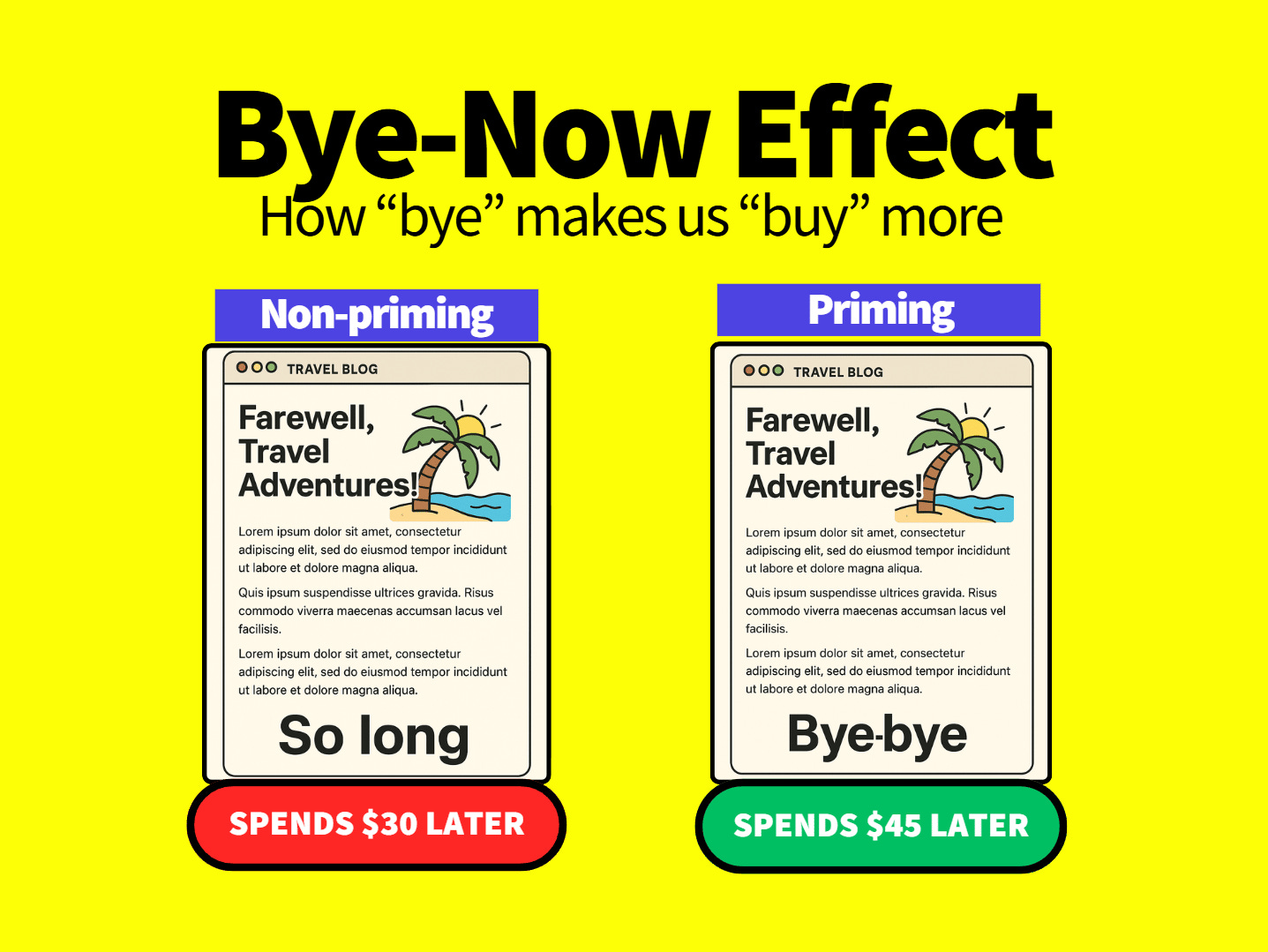
Steps to Apply the Bye-Now Effect in Marketing
1️⃣ Embed Purchase Cues Into Naming
Product names, collections, or features can subtly include language that nudges buying intent. When cues are baked into naming, they influence decisions before evaluation even begins.
2️⃣ Prime Before the Click
Email subject lines, preview text, and headlines are ideal places for micro primes. These moments happen when attention is low and influence is highest.
3️⃣ Pair Words With Visual Proof
Language works best when reinforced visually. Showing real outcomes alongside subtle cues strengthens belief and reduces doubt.
4️⃣ Keep the Cue Natural
Overuse breaks the effect. The word must feel organic to the message, not forced or repetitive.
5️⃣ Use During Decision Moments
Checkout pages, product descriptions, and confirmation moments are where small nudges create outsized impact.
The Takeaway
People do not analyze every decision. They rely on shortcuts. Language is one of the fastest. When used carefully, small word choices can shape perception, reduce hesitation, and increase willingness to buy without pressure or manipulation.
📝 Get More Done in Gmail With Gemini
Email is one of the biggest productivity drains in daily work. Searching threads, writing replies, scheduling meetings, and adjusting tone all add friction. Google’s Gemini integration inside Gmail is designed to remove that friction by turning your inbox into an AI-assisted workspace. Instead of jumping between tools, Gemini works directly where email already lives.
With Gemini enabled, Gmail becomes more than a mailbox. It becomes an assistant that can understand context, summarize information, draft replies, and help coordinate next steps. While this rollout is still early, the core features already unlock meaningful time savings when used intentionally.
Steps to Use Gemini Inside Gmail
1️⃣ Enable Gemini and Smart Features
Start with a Google Workspace account or an AI Pro personal account. Open Gmail, go to Settings, and ensure all Smart Features are turned on. This allows Gemini to read context across your inbox, drafts, and calendar when needed.
2️⃣ Ask Questions About Your Inbox
In the Gmail interface, click the “Ask Gemini” button near the settings icon. You can ask natural-language questions like finding emails related to a topic, summarizing recent conversations, or identifying action items across threads.
3️⃣ Draft Emails With Context Awareness
When writing a new email or reply, use the “Help me write” option or the keyboard shortcut. Gemini reads the thread and generates a response that matches the conversation, saving you from rewriting background or repeating details.
4️⃣ Refine Tone and Length Instantly
Once a draft is generated, you can recreate it or refine it. Adjust the tone to sound more formal or casual, or shorten and expand the message without starting over.
5️⃣ Schedule Meetings Automatically
Use prompts like “Help me schedule” in the draft window. Gemini reviews the email thread, checks available calendars, and suggests meeting times directly in the reply.
The Takeaway
Gemini turns Gmail into a proactive assistant instead of a passive inbox. By combining search, writing, and scheduling into one flow, it reduces context switching and speeds up communication. While still evolving, these features already make email faster, clearer, and easier to manage.
We'd love to hear your feedback on today's issue! Simply reply to this email and share your thoughts on how we can improve our content and format.
Have a great day, and we'll be back again with more such content 😍